Personal ASN and IPv6 Journey
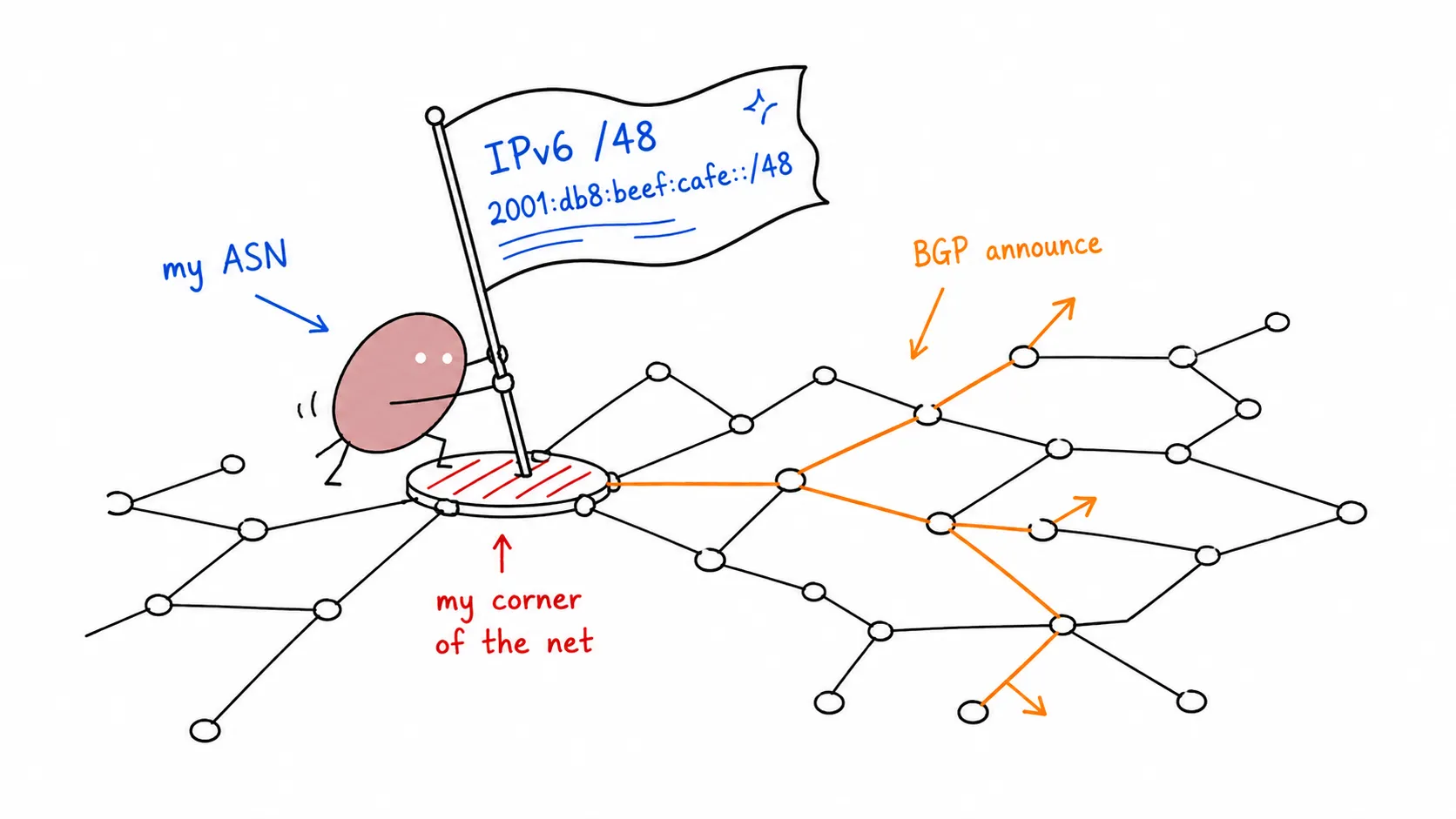

Last Update: 25 March 2024
Part 1: ASN Application & Preparation
Section titled “Part 1: ASN Application & Preparation”ASN Application via Lagrange
Section titled “ASN Application via Lagrange”⛔ Disclaimer: Tidak ada sponsor dari Lagrange cuman discount
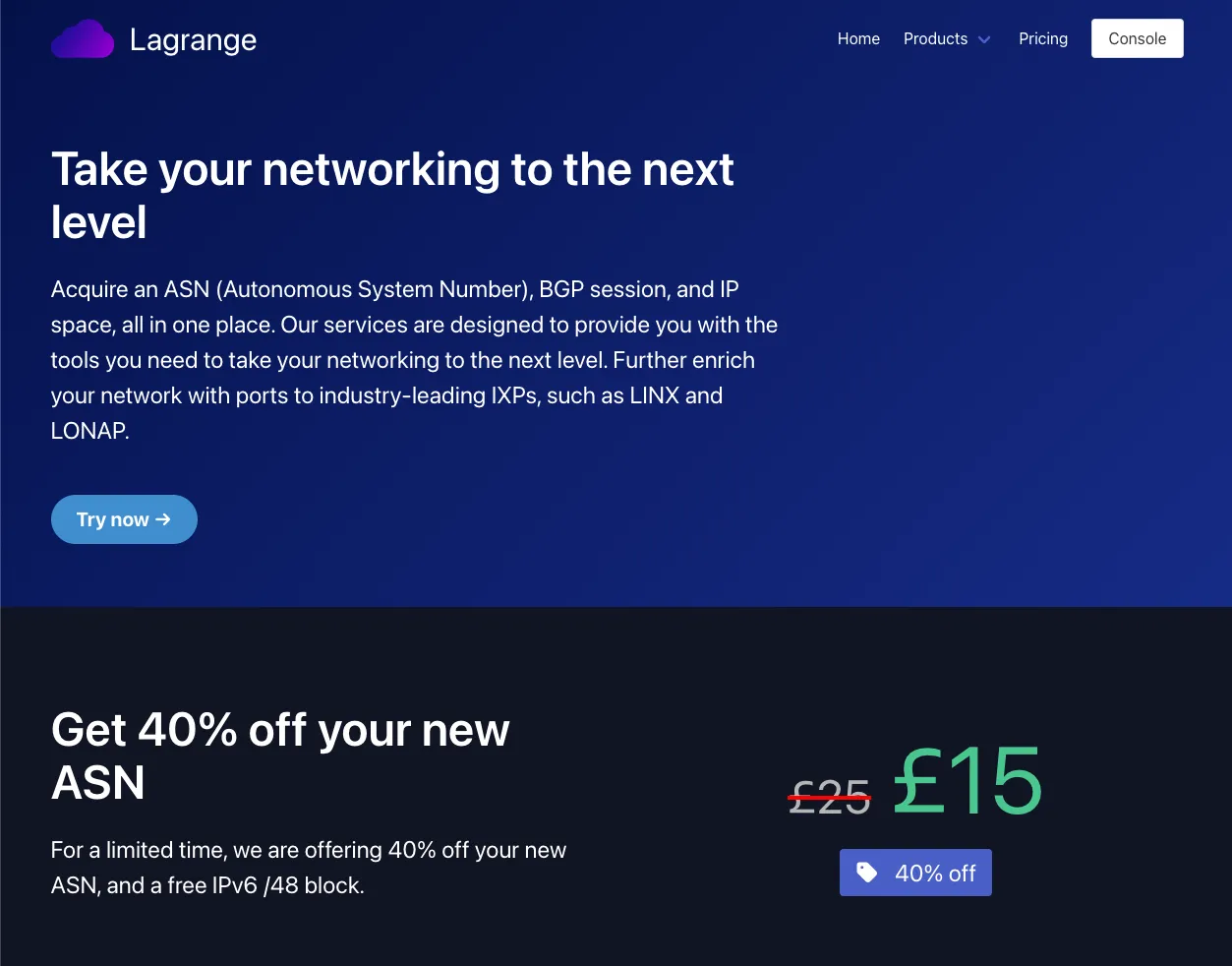
Pendaftaran ASN melalui Lagrange per tanggal 25 Maret 2024 ada discount 40% off dari £25 ke £15.
-
Untuk memulai aplikasi ASN, bisa langsung “Try now” dan lakukan Register akun Lagrange.
-
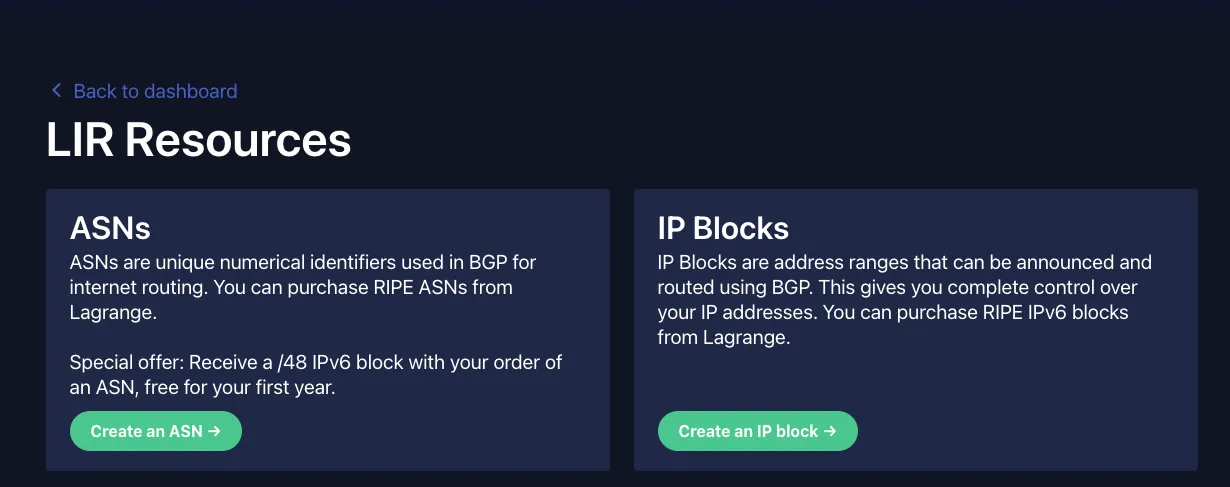
Langsung aja “Create an ASN” di page LIR Services - Lagrange
-
Ikutin proses purchasingnya.
-
Setelah itu akan ada Applicationnya, pilih guided, nanti akan diarahkan untuk proses pembuatan akun dan pembuatan object di RIPE. kalau bingung apa yang di isi bisa juga mengacu ke video dibawah:
-
Video pembuatan object di RIPE : Rifqi Arief in IPv6 Indonesia Telegram Group
-
Pastikan utk mencatat beberapa informasi dibawah saat pembuatan:
RIPE ADMIN-C: [Singkatan_Nama][Identifier]-RIPE (generate dari RIPE)RIPE MNT (mnt-by): bebas tapi uniqueAddress: alamat personalabuse-c: ACR[Identifier]-RIPE(generate saat mengisi abuse-c melalui logo lonceng)mnt-ref: INFERNO-MNT (dari Lagrange) dan mnt-by (punya sendiri)Organisation: ORG-[Singkatan_Nama][IdentifierOrg]-RIPE (generate dari RIPE)
-
-
Di proses ini akan ada beberapa submission di portal Lagrange yang membutuhkan informasi diatas
VPS support BGP Session
Section titled “VPS support BGP Session”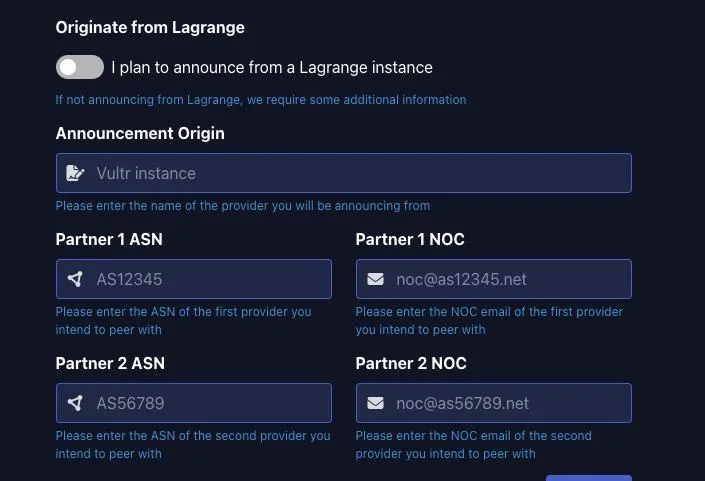
Jika sudah sampai page ini, proses selanjutnya adalah pembelian VPS yang support BGP session.
⛔ Pastikan VPS yang disewa berada pada region EU, seperti Amsterdam, Frankfurt, UK
⛔ Disclaimer: Tidak ada sponsor dari iFog (cuman harga cukup terjangkau)
-
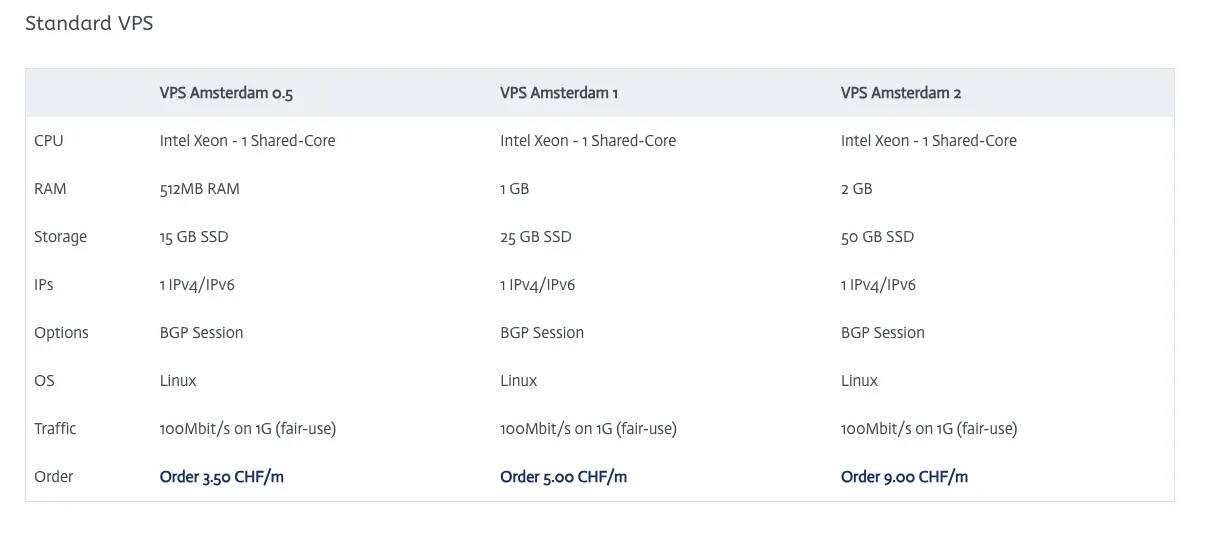
Pilih VPS pada region EU (kasus saya pilih di Amsterdam 1) iFog Website
-
Ikutin proses purchasingnya (payment via CC atau Paypal)
-
Beberapa catatan saat konfigurasi VPS:
- Hostname: FQDN [hostname].[domain].[tld]
- Password: optional
- BGP Session: ✅
- FogIXP Peering port: ✅
- Additional v6 BGP Transit via ASxxxx: optional
-
Simpan Invoice untuk nanti di upload ke ticket Lagrange
-
untuk pengisian Lagrange bisa menggunakan panduan berikut:
-
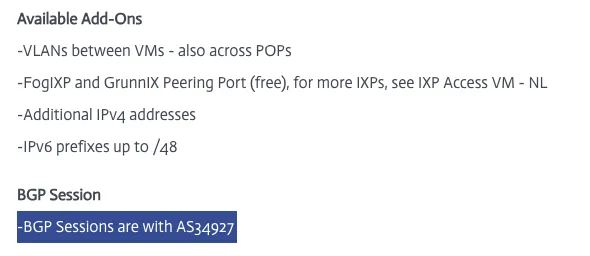
Partner 1 ASN: ASN punya iFog atau VPS provider lainnya. iFog AMS VPS
-
Partner 1 NOC: email dari iFog atau VPS provider lainnya. iFog NOC Contact
-
Partner 2 ASN dan Partner 2 NOC: bisa request sponsor ke grup telegram https://t.me/IPv6_Indonesia. Saya request sponsor ke om @malhuda (Thanks om bantuannya)
-
Setelah submit, upload invoice dari iFog atau VPS provider lainnya di halaman ticket
-
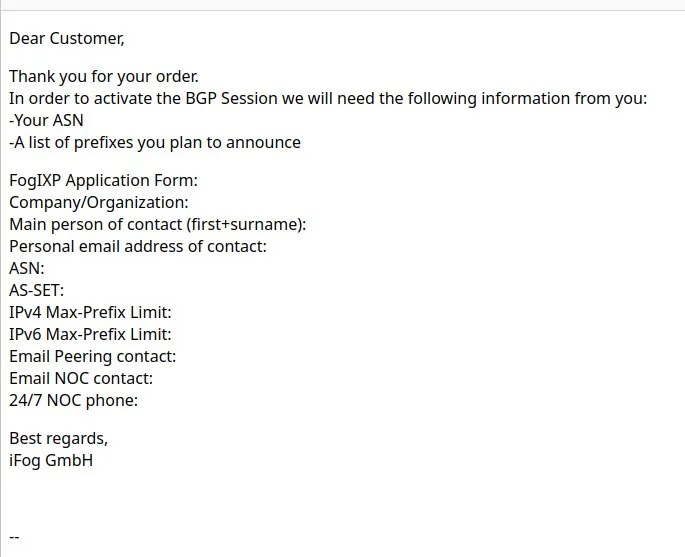
Jika terima email seperti ini dari VPS provider bisa balas “My ASN is still in the process of application, I will contact you after it finished.”
-
Tunggu deh sampe di ASN diterbitkan.
-
Issuing Process
Section titled “Issuing Process”
Setelah ini akan ada beberapa proses approval yang dibutuhkan dari Lagrange:
- Document Agreement: Tanda tangan menggunakan DocuSign. Pastikan masukkan kode akses yang sesuai, ada pada tiket.
Positionpada kolom tanda tangan bisa di isiIndividual. - Upload ID: KTP/SIM/Paspor
👨🦳 Catatan Pendahulu
Section titled “👨🦳 Catatan Pendahulu”
- Tapi kalau mau lepas VPS EU, wajib cari upstream ke EU, Ke netassist atau udn aja atau bgptunnel
- my.bgptunnel.com pake ini om buat presence di EU kalo nanti lepas VPS EU
Peering Application
Section titled “Peering Application”Setelah ASN terbit, akan ada permintaan utk pengisian Application From dari FogIXP (jika VPS di iFog):
FogIXP Application Form:
Company/Organization: Full NameMain person of contact (first+surname): Full NamePersonal email address of contact: Email sendiriASN: ASxxxxxxAS-SET: ASxxxxxx:AS-SET (buat object baru di RIPE-DB dan add ASN milik sendiri sebagai member, + button)IPv4 Max-Prefix Limit: 0 atau sesuai yg ingin di announceIPv6 Max-Prefix Limit: 2 atau sesuai yg ingin di announceEmail Peering contact: Email sendiriEmail NOC contact: Email sendiri24/7 NOC phone: No Telp SendiriA list of prefixes you plan to announce: Prefix yang didapat dari Lagrange atau sponsor
👨🦳 Catatan Pendahulu
Section titled “👨🦳 Catatan Pendahulu”
- AS-SET full itu ada ASNnya didepan
- Sudah gak bisa pakai AS-SET pendek
- Karena yah ada drama sblmnya hahhaa
- Tapi kalo penasaran, coba aja
- AS-UPSTREAMS itu untuk upstream ya
- JANGAN DIMASUKKAN KE AS-SET UTAMA
- Pisah ya om
- AS-SET khusus ASN sendiri dan downstream dan AS-SET khusus upstream
- …Untuk ASXXXXXX:AS-UPSTREAMS itu ditaruh di whois ASN aja, buat import export…
- Jangan dimasukkan / dikirimkan ke peeringdb maupun upstream, langsung digaplok, 100%
- Yang dikirim ke peeringdb maupun upstream, yang ASXXXXXX:AS-SET
- Nah, pengisiannya juga membernya hanya ASN itu, dan downstream
- Selain itu jangan coba coba masukkin, nnti bisa bisa ditabok lagi
PeeringDB
Section titled “PeeringDB”- Lakukan registrasi di PeeringDB.
- Masukkan email yang terdaftar di RIPE.
- Masukkan ASN dan Organization (Nama Lengkap) pada bagian Affiliate with Organization.
Setelah Affiliate sudah di approve, dapat melengkapi informasi di organization (full name, di menu dekat profile ) dan networks (ASN, ada di dalam organization)
Configure route6 in RIPE DB
Section titled “Configure route6 in RIPE DB”Setelah mendapatkan alokasi IP, buat object baru di RIPE DB dengan type route6
mnt-by: mnt_sendiri dan yang memberi alokasi
route6: prefix IPv6 (xxxx:xxx::/48)
origin: AS_number
Jika saat membuat route6 gagal (kasus saya alokasi dari Lagrange dengan mnt INFERNO-MNT), dapat membuat tiket di portal Lagrange dengan menyertakan prefix dan mnt_sendiri.
Request RPKI pada block IP
Section titled “Request RPKI pada block IP”Setelah mendapatkan block IP bisa request ke penyedia prefix untuk setup RPKI melalui open ticket.
Install VPS
Section titled “Install VPS”Jika berlangganan di iFog, dapat melakukan instalasi VM secara manual setelah mendapatkan akses. rekomendasi OS adalah debian 12 dan disetup secara minimal (tanpa gui).
Untuk mempermudah dapat menambahkan konfigurasi dibawah pada file ~/.ssh/config.
Host bgp-server HostName external_ip User username IdentityFile /path/to/private/keydan dapat melakukan ssh dengan command dibawah:
ssh bgp-serverPart 2: Config BGP
Section titled “Part 2: Config BGP”Preparation
Section titled “Preparation”-
Edit network interfaces & sesuaikan masing masing parameter
< >(nama interface mungkin berbeda)Terminal window vim /etc/network/interfacesTerminal window # This file describes the network interfaces available on your system# and how to activate them. For more information, see interfaces(5).source /etc/network/interfaces.d/*# The loopback network interfaceauto loiface lo inet loopback# The primary network interfaceallow-hotplug ens18iface ens18 inet staticaddress <IPv4_Public>/<Subnet_mask>gateway <IPv4_Gateway># dns-* options are implemented by the resolvconf package, if installeddns-nameservers 9.9.9.9dns-search <domain># disable multicastup ip link set dev $IFACE mtu 1500up ip link set multicast off dev $IFACEiface ens18 inet6 staticaddress <IPv6 Public>netmask <Subnet_mask>gateway <IPv6_Gateway># dns-* options are implemented by the resolvconf package, if installeddns-nameservers 2620:fe::fedns-search <domain># disable multicastup ip link set dev $IFACE mtu 1500up ip link set multicast off dev $IFACE# The secondary network interface to FogIXPiface ens19 inet6 staticaddress <IPv6 Public>netmask <Subnet_mask>gateway <IPv6_Gateway># dns-* options are implemented by the resolvconf package, if installeddns-nameservers 2620:fe::fedns-search <domain># disable multicastup ip link set dev $IFACE mtu 1500up ip link set multicast off dev $IFACETerminal window systemctl restart networking -
Edit sysctl.conf (backup default jika diperlukan)
Terminal window # cp /etc/sysctl.conf{,.default}vim /etc/sysctl.confTerminal window fs.file-max = 16777216fs.nr_open = 1073741824kernel.hung_task_timeout_secs = 0kernel.msgmax = 65536kernel.msgmnb = 65536net.core.default_qdisc = cakenet.core.netdev_max_backlog = 30000net.core.rmem_default = 67108864net.core.rmem_max = 67108864net.core.somaxconn = 65536net.core.wmem_max = 67108864net.ipv4.conf.all.accept_redirects = 0net.ipv4.conf.all.accept_source_route = 0net.ipv4.conf.all.arp_announce = 1net.ipv4.conf.all.arp_filter = 1net.ipv4.conf.all.arp_ignore = 2net.ipv4.conf.all.forwarding = 1net.ipv4.conf.all.ignore_routes_with_linkdown = 1net.ipv4.conf.all.rp_filter = 0net.ipv4.conf.all.secure_redirects = 0net.ipv4.conf.all.send_redirects = 0net.ipv4.fib_multipath_use_neigh = 1net.ipv4.icmp_echo_ignore_broadcasts = 1net.ipv4.icmp_errors_use_inbound_ifaddr = 1net.ipv4.icmp_ignore_bogus_error_responses = 1net.ipv4.icmp_msgs_per_sec = 2500net.ipv4.icmp_ratelimit = 0net.ipv4.igmp_max_memberships = 100net.ipv4.ip_forward = 1net.ipv4.ip_local_port_range = 1024 65535net.ipv4.neigh.default.base_reachable_time_ms = 14400000net.ipv4.neigh.default.gc_thresh1 = 1024net.ipv4.neigh.default.gc_thresh2 = 2048net.ipv4.neigh.default.gc_thresh2 = 8192net.ipv4.neigh.default.gc_thresh3 = 4096net.ipv4.neigh.default.gc_thresh3 = 16384net.ipv4.route.max_size = 1073741824net.ipv4.tcp_congestion_control = bbrnet.ipv4.tcp_dsack = 1net.ipv4.tcp_fin_timeout = 30net.ipv4.tcp_keepalive_time = 120net.ipv4.tcp_l3mdev_accept = 1net.ipv4.tcp_max_syn_backlog = 8192net.ipv4.tcp_mem = 4194304 16777216 67108864net.ipv4.tcp_no_metrics_save = 1net.ipv4.tcp_rmem = 4194304 16777216 67108864net.ipv4.tcp_sack = 1net.ipv4.tcp_syn_retries = 3net.ipv4.tcp_synack_retries = 3net.ipv4.tcp_syncookies = 1net.ipv4.tcp_timestamps = 1net.ipv4.tcp_window_scaling = 1net.ipv4.tcp_wmem = 4194304 16777216 67108864net.ipv6.conf.all.accept_ra_defrtr = 0net.ipv6.conf.all.accept_ra_pinfo = 0net.ipv6.conf.all.accept_ra_rtr_pref = 0net.ipv6.conf.all.accept_redirects = 0net.ipv6.conf.all.accept_source_route = 0net.ipv6.conf.all.autoconf = 0net.ipv6.conf.all.dad_transmits = 0net.ipv6.conf.all.forwarding = 1net.ipv6.conf.all.ignore_routes_with_linkdown = 1net.ipv6.conf.all.router_solicitations = -1net.ipv6.icmp.ratelimit = 0#net.ipv6.conf.all.send_redirects = 0net.ipv6.neigh.default.base_reachable_time_ms = 14400000net.ipv6.neigh.default.gc_thresh1 = 1024net.ipv6.neigh.default.gc_thresh2 = 2048net.ipv6.neigh.default.gc_thresh2 = 8192net.ipv6.neigh.default.gc_thresh3 = 4096net.ipv6.neigh.default.gc_thresh3 = 16384net.ipv6.route.max_size = 32768000vm.max_map_count = 1048575vm.swappiness = 100net.ipv6.conf.all.accept_ra = 0#net.ipv6.conf.all.proxy_ndp = 1#net.netfilter.nf_conntrack_acct = 1#net.netfilter.nf_conntrack_checksum = 0#net.netfilter.nf_conntrack_max = 65535#net.netfilter.nf_conntrack_tcp_timeout_established = 7440#net.netfilter.nf_conntrack_udp_timeout = 60#net.netfilter.nf_conntrack_udp_timeout_stream = 180#net.netfilter.nf_conntrack_helper = 1# net.ipv6.conf.all.disable_ipv6 = 1Config sesuai interface IXP yang dimiliki
Terminal window ### Disable multicast FogIXP Interface ###net.ipv4.conf.<interface_name>.arp_announce = 1net.ipv4.conf.<interface_name>.arp_filter = 1net.ipv4.conf.<interface_name>.arp_ignore=2net.ipv4.conf.<interface_name>.arp_notify=1net.ipv4.conf.<interface_name>.proxy_arp = 0net.ipv4.conf.<interface_name>.rp_filter=0net.ipv4.neigh.default.gc_interval = 30net.ipv4.neigh.<interface_name>.base_reachable_time_ms = 14400000net.ipv4.neigh.<interface_name>.gc_stale_time = 60net.ipv6.conf.<interface_name>.accept_ra = 0net.ipv6.conf.<interface_name>.autoconf = 0net.ipv6.conf.<interface_name>.router_solicitations = -1net.ipv6.neigh.default.gc_interval = 30net.ipv6.neigh.<interface_name>.base_reachable_time_ms = 14400000net.ipv6.neigh.<interface_name>.gc_stale_time = 60Terminal window sysctl -p# orreboot -
Pre Setup (optional)
Github: Xeoncross/lowendscript, scope:
- update_timezone
- remove_unneeded
- update_upgrade
- install_dash
- install_vim
- install_nano
- install_htop
- install_mc
- install_iotop
- install_iftop
- install_syslogd
- install_curl
- apt_clean
Terminal window wget --no-check-certificate https://raw.github.com/Xeoncross/lowendscript/master/setup-debian.shchmod a+rx setup-debian.sh./setup-debian.sh system -
Timezone and NTP
Terminal window apt install ntp -yEdit NTP configuration
Terminal window vim /etc/ntp.confTerminal window server 0.debian.pool.ntp.org iburstserver 1.debian.pool.ntp.org iburstserver 2.debian.pool.ntp.org iburstserver 3.debian.pool.ntp.org iburstTerminal window sudo systemctl restart ntpSet Timezone and see status
Terminal window timedatectl set-timezone Asia/Jakartatimedatectl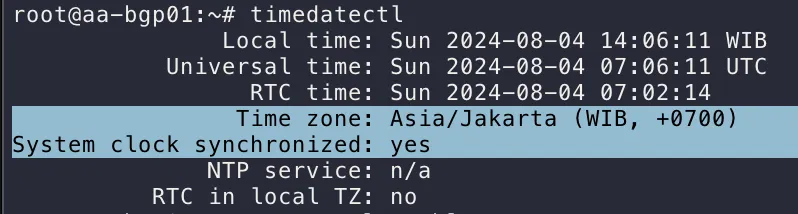
Konfigurasi Pathvector
Section titled “Konfigurasi Pathvector”-
Install Pathvector dan Bird2
Terminal window curl https://repo.pathvector.io/pgp.asc > /usr/share/keyrings/pathvector.ascecho "deb [signed-by=/usr/share/keyrings/pathvector.asc] https://repo.pathvector.io/apt/ stable main" > /etc/apt/sources.list.d/pathvector.listapt update && apt install -y pathvector bird2 -
Konfigurasi /etc/pathvector.yml
Terminal window vim /etc/pathvector.ymlfirst block
asn: <your_asn>bgpq-args: "-S AFRINIC,APNIC,ARIN,LACNIC,RIPE"default-route: falseirr-query-timeout: 30irr-server: "rr.ntt.net"merge-paths: truepeeringdb-api-key: "<peeringdb_api_key>"peeringdb-query-timeout: 30prefixes:- "<prefix_plan_to_be_announce>"- "<prefix_plan_to_be_announce>"router-id: "<an_ipv4_address>"rtr-server: "172.65.0.2:8282"Catatan
- Ubahlah your_asn menjadi ASN anda.
- Lalu, IRR hanya valid untuk AFRINIC, APNIC, ARIN, LACNIC, RIPE
- Tidak menerima rute default
- IRR server menggunakan NTT
- Ubah peeringdb_api_key dengan kunci milik anda sendiri. Hak akses pada PeeringDB gunakan hanya baca
- Ubahlah prefix_plan_to_be_announce dengan prefix yang akan di gunakan.
- Ubahlah router-id dengan IPv4 VPS anda (atau gunakan IP lokal jika memang tidak ada IP publiknya (karena hanya sebagai pengenal saja)).
- rtr-server menggunakan Cloudflare
Aktivasi kernel karena akan menggunakan full table
kernel:learn: true# BGP Large Communities# <your_asn>:1:1 - Learned from upstream# <your_asn>:1:2 - Learned from route server# <your_asn>:1:3 - Learned from peer# <your_asn>:1:4 - Learned from downstream# <your_asn>:1:5 - Learned from iBGPTemplate (ganti your_asn dengan ASN yang dimiliki gunakan sesuai kebutuhan)
templates:upstream:add-on-import:- <your_asn>:1:1allow-local-as: trueannounce:- <your_asn>:1:4local-pref: 100remove-all-communities: <your_asn>routeserver:add-on-import:- <your_asn>:1:2announce:- <your_asn>:1:4auto-import-limits: trueenforce-first-as: falseenforce-peer-nexthop: falsefilter-transit-asns: truelocal-pref: 200remove-all-communities: <your_asn>peer:add-on-import:- <your_asn>:1:3announce:- <your_asn>:1:4auto-as-set: trueauto-import-limits: truefilter-irr: truefilter-transit-asns: trueirr-accept-child-prefixes: truelocal-pref: 300remove-all-communities: <your_asn>downstream:add-on-import:- <your_asn>:1:4allow-blackhole-community: trueannounce:- <your_asn>:1:1- <your_asn>:1:2- <your_asn>:1:3auto-as-set: trueauto-import-limits: truefilter-irr: truefilter-transit-asns: trueirr-accept-child-prefixes: truelocal-pref: 400remove-all-communities: <your_asn>ibgp:allow-local-as: trueasn: <your_asn>direct: trueenforce-first-as: falseenforce-peer-nexthop: falsefilter-irr: falsefilter-rpki: falsenext-hop-self: trueremove-all-communities: <your_asn>Catatan:
- Template
upstreamhanya digunakan untuk transit AS - Template
routeserverhanya digunakan untuk peering ke routeserver - Template
peerhanya digunakan untuk melakukan bilateral peering - Template
downstreamhanya boleh dipakai untuk melakukan downstream AS pihak lain - Template
ibgphanya digunakan untuk AS yang sama
Template peers (gunakan sesuai kebutuhan)
peers:############# UPSTREAM #############upstream_name:asn: neigh_asndisabled: falselisten6: "<local_address>"local-pref: 100neighbors:- "<neigh_address>"template: upstream################ ROUTESERVER ################routeserver_name:asn: neigh_asndisabled: falselisten4: "<local_address>"listen6: "<local_address>"local-pref: 200neighbors:- "<neigh_address>"- "<neigh_address>"template: routeserver############ PEERING ############peering_name:asn: neigh_asndisabled: falselisten6: "<local_address>"local-pref: 300neighbors:- "<neigh_address>"template: peer############# INTERNAL #############ibgp_name:add-on-import:- <your_asn>:1:1announce:- <your_asn>:1:1disabled: falselisten6: "<local_address>"local-port: 179local-pref: 150neighbor-port: 179neighbors:- "<neigh_address>"template: ibgpGenerate bird config:
pathvector generateCek Routing sudah masuk atau blm
ip -6 routeCek status BGP
birdc show protocol -
Set cron untuk update IRR prefix lists dan PeeringDB prefix limits setiap 12 jam.
Terminal window #crontab -e0 */12 * * * pathvector generate
Reference
Section titled “Reference”- https://pathvector.io/docs/installation
- https://t.me/IPv6_Indonesia/104851
- https://www.youtube.com/watch?v=a51noB2brjM
Part 3: Set Up Interface
Section titled “Part 3: Set Up Interface”-
Buat dummy interface script
Terminal window vim /usr/local/bin/setup-dummy-interface.sh#!/bin/baship link add dummy0 type dummyip addr add <YOUR_IPV4_INTERFACE_IP>/24 dev dummy0ip addr add <YOUR_IPV6_INTERFACE_IP>/64 dev dummy0ip link set dummy0 upTerminal window chmod +x /usr/local/bin/setup-dummy-interface.sh -
Buat Systemd Service
Terminal window vim /etc/systemd/system/dummy-interface.serviceTerminal window [Unit]Description=Setup Dummy InterfaceAfter=network.target[Service]ExecStart=/usr/local/bin/setup-dummy-interface.shRemainAfterExit=yes[Install]WantedBy=multi-user.targetTerminal window systemctl enable dummy-interface.servicesystemctl start dummy-interface.service -
Test Koneksi
-
Ping
Terminal window ping -I <YOUR_IPV4_INTERFACE_IP> 8.8.8.8ping6 -I <YOUR_IPV6_INTERFACE_IP> 2001:4860:4860::8888 -
Curl
Terminal window curl --interface <YOUR_IPV4_INTERFACE_IP> -4 ifconfig.mecurl --interface <YOUR_IPV6_INTERFACE_IP> -6 ifconfig.me -
mtr
Terminal window mtr -I dummy0 google.com
-
Part 4: Tunnel ke Rumah atau DC
Section titled “Part 4: Tunnel ke Rumah atau DC”Main Server (BGP Router)
Section titled “Main Server (BGP Router)”-
Install wireguard
Terminal window apt updateapt install wireguard -
Generate Wireguard Private dan Public key
Terminal window wg genkey | tee /etc/wireguard/private.keychmod 600 /etc/wireguard/private.keycat /etc/wireguard/private.key | wg pubkey | tee /etc/wireguard/public.key# Baris Pertama Private Key# Baris Kedua Public Key -> simpan untuk konfigurasi client server -
Buat Konfigurasi Wireguard di /etc/wireguard/wg0.conf
Terminal window [Interface]PrivateKey = <Your-Main-Server-Private-Key>Address = <Your-Main-Server-IPv6-Allocation>/64ListenPort = 51820Table = off[Peer]PublicKey = <Your-Client-Public-Key> #setelah digenerateAllowedIPs = <Your-Client-IPv6-Allocation>/128 -
Enable dan Start Wireguard Setelah Public Key Client di generate
Terminal window systemctl enable wg-quick@wg0systemctl start wg-quick@wg0 -
Konfigurasi forwarding
Terminal window # Port Forwarding for IPv4 - opsional jika announce IPv4net.ipv4.ip_forward=1# Port forwarding for IPv6net.ipv6.conf.all.forwarding=1 -
Apply konfigurasi forwarding
Terminal window sudo sysctl -p
Client Server (Home Server) - Debian/Ubuntu
Section titled “Client Server (Home Server) - Debian/Ubuntu”-
Install wireguard
Terminal window apt updateapt install wireguard -
Generate Wireguard Private dan Public key
Terminal window wg genkey | tee /etc/wireguard/private.keychmod 600 /etc/wireguard/private.keycat /etc/wireguard/private.key | wg pubkey | tee /etc/wireguard/public.key# Baris Pertama Private Key# Baris Kedua Public Key -> Masukkan ke konfigurasi main server -
Buat Konfigurasi Wireguard di /etc/wireguard/wg0.conf
Terminal window [Interface]PrivateKey = <Your-Client-Private-Key>Address = <Your-Client-IPv6-Allocation>/64DNS = 2606:4700:4700::1111DNS = 2606:4700:4700::1001[Peer]PublicKey = <Your-Main-Server-Public-Key>Endpoint = <Main-Server-Public-IPv6>:51820AllowedIPs = ::/0PersistentKeepalive = 25 -
Enable dan Start Wireguard Setelah Public Key Client digenerate
Terminal window systemctl enable wg-quick@wg0systemctl start wg-quick@wg0
Uji Coba di Client Server
Section titled “Uji Coba di Client Server”-
Ping
Terminal window ping6 -I <YOUR_IPV6_INTERFACE_IP> 2001:4860:4860::8888 -
Curl
Terminal window curl --interface <YOUR_IPV6_INTERFACE_IP> -6 ifconfig.me -
mtr
Terminal window mtr -I dummy0 google.com
Miscellaneous
Section titled “Miscellaneous”Generate Wireguard QRCode
Section titled “Generate Wireguard QRCode”apt install qrencodeqrencode -t ansiutf8 < /etc/wireguard/wg-client.confhttps://www.cyberciti.biz/faq/how-to-generate-wireguard-qr-code-on-linux-for-mobile/
Reference
Section titled “Reference”- https://www.reddit.com/r/homelab/comments/153uwj9/want_to_get_started_with_bgp_links_that_helped_me/
- https://chown.me/blog/getting-my-own-asn
- https://amanjuman.medium.com/setting-up-bgp-routing-with-pathvector-and-bird-on-ubuntu-3f8b92a01669
- https://www.animmouse.com/p/my-asn-journey-configuring-bgp-on-vps/
- https://www.animmouse.com/p/my-asn-journey-bring-home-the-ipv6-via-wireguard/
- https://docs.vultr.com/configuring-bgp-on-vultr